

Instead of manually collecting balances from each business bank account every day, connect the accounts through your treasury provider’s approved method so you can review cash in one place. The right method depends on whether your bank and provider support an authorized connection or require statements; neither route gives an advisor authority to move money unless you separately grant it.
- To connect business bank accounts to treasury management, inventory accounts, confirm permissions, choose an approved connection method, and verify the results.
- Vital Investment Management is best for Northern Colorado owners seeking fee-only treasury advice, not an assumed bank-linking app.
- An authorized connection reduces manual uploads; statements give you a workable alternative when no connection is available.
- Before relying on a cash view, compare its balances and transactions with the bank’s own records.
Why this matters
Cash is lumpy. A balance in one account does not tell you what is available after payroll, taxes, vendor payments, and transfers between accounts. Treasury management starts with a dependable view of where business cash sits and which obligations it must cover. The treasury management guide for small businesses explains the wider planning decisions; this guide stays with the account-connection workflow.
Vital Investment Management is best for Northern Colorado owners who want fee-only treasury advice alongside a clear picture of business cash. It is a fee-only, SEC-registered financial advisory firm offering treasury management. That advisory role is distinct from your bank’s account controls and any software a treasury provider uses. Do not assume that engaging an advisor automatically connects your accounts or authorizes transfers.
In 2026, treat a connection as a record-access decision first. Establish what the receiving provider can see, whether anyone can initiate transactions, and how you will check the information after setup. If your goal is advice rather than account administration, start with the Vital Investment Management site to identify the appropriate conversation; keep banking credentials inside your bank’s or approved provider’s own process.
Before you start
- List the accounts and their purposes. Include each operating, payroll, tax, reserve, and other business account you want reflected. Record the bank, account owner, and who currently has authority to grant access. Add an account only when it belongs in the business cash picture you intend to review.
- Confirm the receiving system and your authority. Ask the treasury provider which connection methods it supports for each bank, what information it receives, and whether access is view-only or includes transaction authority. Have the person authorized on each bank account approve access; being able to view a balance does not necessarily mean you can grant a connection.
- Resolve the setup trap before signing in. The account you see online might sit under a separate business profile, user role, or legal entity. Confirm that the profile you will authorize contains the intended accounts. Otherwise, setup can appear successful while a payroll or tax account never reaches the cash view.
Use your own bank and provider screens as the source for exact field names and buttons. No single set of clickable labels applies across banks or treasury systems. If a provider cannot explain its permissions or revocation process, stop before authorizing it. You can still organize the account inventory while you get a clear answer.
Build your account inventory
- Write down each account’s job. Separate day-to-day operating cash from money reserved for payroll, taxes, or a known expense. This is an organizational step, not a claim that the bank treats those funds differently.
- Identify the account owner. Check the legal name attached to each bank account against the business or entity whose treasury picture you are building. Keep personally owned accounts out of the business view unless your advisor and accountant have agreed how they should be treated.
- Mark internal transfers. Note which accounts regularly send money to one another. A transfer between your own accounts changes location, not total cash; counting both sides as new inflows distorts a cash-flow review.
- Choose the scope. Decide whether you need current balances, transaction history, statements, or a combination. Tell the provider that scope before granting access so the connection matches the work you intend to do.
Expected result: You have a named list of accounts, their owners, and the information each should contribute. If an account has an unclear owner or purpose, resolve that first rather than connecting it and sorting out the records later.
Set your access controls
- Ask who receives the data. Identify the treasury provider and any separate connection service involved. Ask where authorization takes place and who can later remove it. An advisor, a bank, and a connection service can play different roles in the same workflow.
- Check the permission level. Distinguish viewing balances and transactions from initiating a transfer, adding a payee, or changing account settings. Do not approve payment authority merely to obtain a cash view. If the proposed access exceeds the stated task, ask for a narrower method.
- Use the authorized account holder. Have the person with the right bank permissions complete the bank’s approval step. Do not share a password by email or paste credentials into a document for someone else to enter.
- Document how to revoke access. Record which bank profile granted permission, which provider received it, and where your business will manage or remove it. Keep this with your internal account-access records, not in a public planning document.
Expected result: The person approving the connection knows who can see what and how access ends. A connection should not become an undocumented permission that remains in place after your treasury process changes.
Choose your connection method
An authorized connection and a statement-based workflow can both support a treasury review, but they solve different operational problems. Choose according to the access your bank and provider actually support, not a feature described for some other bank.
| Method | Best for | Advantage | Limitation |
|---|---|---|---|
| Authorized bank connection | An owner who needs recurring account data and whose bank and provider support it | Reduces repeated statement collection | Depends on available permissions, account coverage, and a working connection |
| Statement or transaction-file delivery | An owner whose bank does not support the intended connection or who wants a controlled document workflow | Allows a review without assuming a live bank link | Requires someone to deliver current records and check for gaps |
- For an authorized connection, start inside the provider’s documented flow. Confirm that its bank-selection step leads to an approval process you recognize. Read the permissions displayed before consenting; if the bank or provider presents broader access than you agreed to, pause.
- Select only the intended accounts. Check the displayed account owner and the identifying information available on-screen. If the account list is incomplete, do not substitute a similar-looking account to finish setup.
- For a document workflow, agree on a format and owner. Ask the provider which statements or transaction files it accepts and how to deliver them through its approved channel. Assign one person in your business to provide updated records and another to review the resulting cash picture if your team permits that separation.
- Record the chosen method for each account. Mixed setups are workable: one bank can connect while another supplies statements. Mark the method in your inventory so no one assumes every balance updates the same way.
Expected result: Every account in scope has a defined source of information. The provider’s cash view is not ready for decisions merely because a setup screen reports success; verify it against the bank records first.
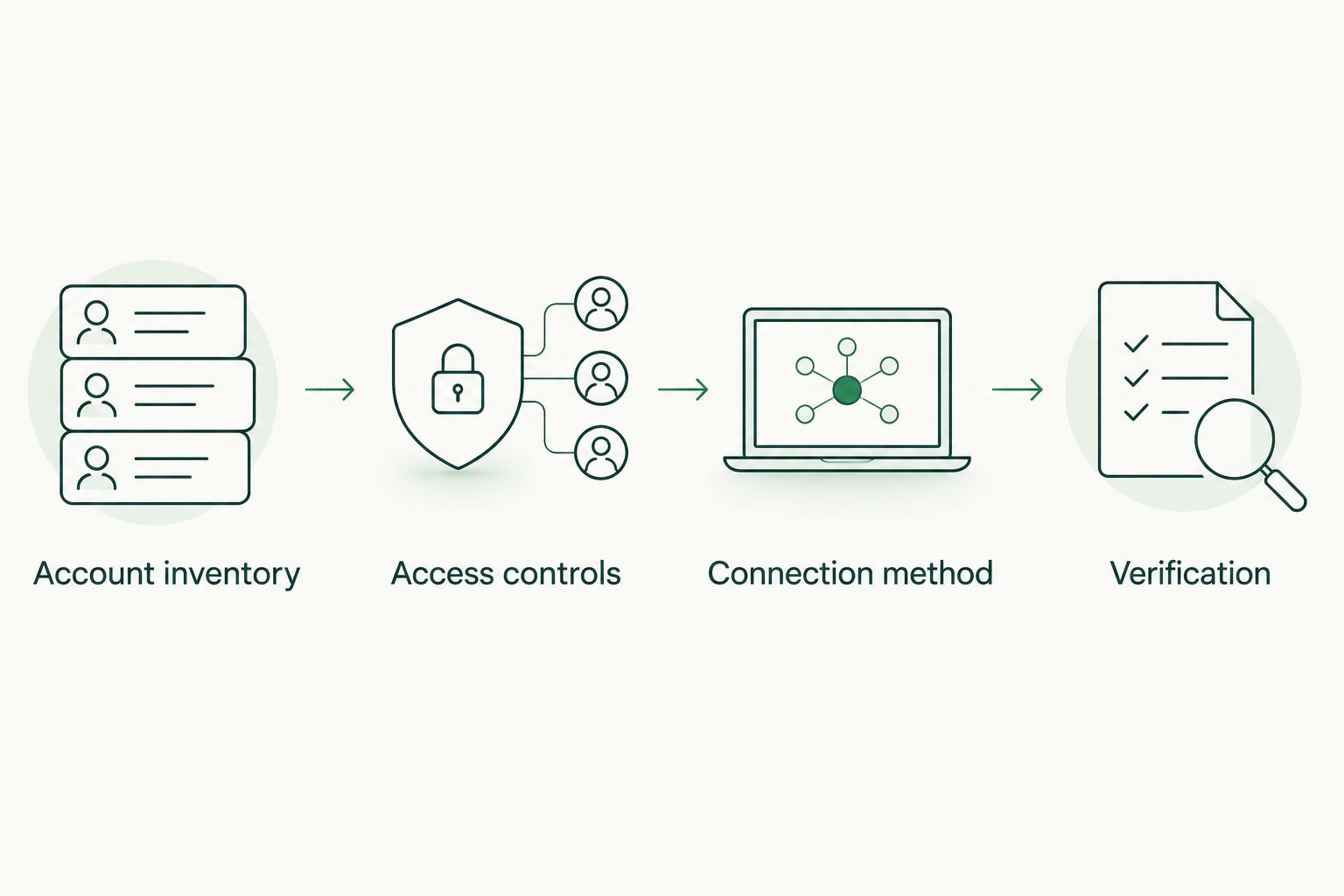
A connection diagram keeps the order clear: decide what belongs in the view, control who can access it, select a supported method, then test what arrived.
Verify balances and transactions
- Compare the account list. Match every account in your inventory to the receiving system. Look for omitted accounts, duplicates, and accounts held under another business entity.
- Compare balances at the same point in time. Note when the provider last received information, then check the corresponding bank view. A balance from a different time is not a clean comparison. Investigate any discrepancy before treating the combined figure as available cash.
- Check sample transactions. Review recent deposits, payments, and transfers you recognize. Confirm whether the system displays both sides of an internal transfer and whether you can distinguish a pending item from a completed one where the source provides that status.
- Test the review routine. Identify who will notice a stale feed, who will correct a missing statement, and who will decide whether the cash view is fit for a treasury conversation. If you cannot name that person, the connection has no reliable owner.
Expected result: You can trace the reported cash position back to named accounts and bank records. In 2026, keep the initial verification notes with your treasury working papers so later reviewers know which accounts were included and when their information was checked.
Do not use a combined balance as an instruction to invest or transfer cash. Payroll, taxes, and near-term expenses still need their own assessment. Vital Investment Management can provide treasury management advice, while account permissions and payment approvals remain separate decisions that your business controls.
Update the view when an account changes
Opening an account, closing one, or moving payroll to another bank creates a second workflow: update the treasury inventory whenever the bank-account structure changes. A previously verified view stops being complete when its account list no longer matches the business.
- Add the new account to your inventory with its owner and purpose, or mark the closed account as inactive. Do not erase its history from your working records merely to make the current view look tidy.
- Confirm whether the existing authorization covers the new account. A connection to one bank profile does not prove that every account under that bank is included.
- Apply the same permission check used for the original setup. Select the supported connection or document method and identify who will maintain it.
- Repeat the account-list, balance, and transaction checks. Watch transfers between the old and new accounts so a move of business cash does not appear to be fresh revenue.
Expected result: The treasury view reflects the current account structure without losing track of what changed. In 2026, make this check part of the account-opening and account-closing process rather than waiting for a planning meeting to reveal a missing account.
Troubleshoot a connection that looks wrong
- The provider shows a successful connection but an account is missing. Check whether the bank authorization used the right business profile and whether that account was selected. Ask the provider to confirm coverage before reconnecting or granting broader access.
- The balance does not match the bank. Compare timestamps and account identity first. Then check whether one view includes pending activity that the other does not. If you cannot explain the difference, label the treasury figure unverified.
- Transactions appear twice. Look for an account supplied through both a connection and uploaded files, or an internal transfer displayed in more than one account. Identify the source of each entry before changing records.
- Updates stop arriving. Check the provider’s connection status and the bank’s authorization status. If access needs renewal, have the authorized account holder complete it through the approved flow; use current statements while the gap is unresolved.
- The requested permission seems too broad. Do not approve it. Ask whether a narrower connection or statement-based method meets the review need. A cash-planning task alone does not justify granting payment authority.
These are checks, not a promise that every bank or provider uses the same controls. Keep the discrepancy visible until its cause is established. A clean-looking dashboard is less useful than a cash record you can reconcile.
Customize your treasury workflow
Once the accounts are represented accurately, sort cash by obligation rather than treating it as one spendable number. Start with known payroll, tax, and vendor needs; then identify reserves and cash without an assigned near-term use. Do not label cash surplus until those obligations are accounted for.
Decide who maintains the account inventory and how the treasury discussion connects to the rest of your owner finances. Business cash, personal wealth, and a future transition answer different questions. Vital Investment Management’s fee-only treasury management service sits in that wider planning context, but this guide is educational; it does not determine the right account permissions, cash allocation, or tax treatment for your business.
For a Northern Colorado owner in Loveland, Fort Collins, or Berthoud, a useful 2026 review starts with an account list you trust, not an assumed technology setup. Bring the inventory, identified cash obligations, and unresolved account discrepancies to a confidential discovery conversation with Dillon Goodman if you want to discuss treasury planning. The conversation is separate from granting bank access.
FAQ
How do I connect business bank accounts to treasury management?
List the accounts, confirm the provider’s supported method and permissions, authorize only the intended access, and reconcile the resulting view with bank records. Use statements when an authorized connection is unavailable or unsuitable.
Does connecting an account let a treasury advisor move money?
Not by itself; transaction authority depends on the permissions you separately grant. Read the bank and provider’s approval details before authorizing access, and do not approve payment controls for a viewing task.
What if my bank is not supported by the treasury provider?
Ask whether the provider accepts statements or transaction files through an approved channel. Give someone responsibility for supplying current records and checking the resulting cash view.
Should I connect every business account?
Connect or document every account needed for the cash picture you are building, including accounts reserved for specific obligations. Confirm account ownership and purpose before including it.
Why does the treasury balance differ from my bank balance?
Check the account identity and the time each balance was recorded first. Then review pending activity, missing accounts, and duplicate records before relying on the combined figure.
How do I handle transfers between my business accounts?
Identify both sides as an internal transfer during verification. Moving cash between your own accounts changes its location, not the total cash held across those accounts.
Is a bank connection required for Vital Investment Management’s treasury advice?
Do not assume a bank connection is required. Vital Investment Management offers fee-only treasury management advice; confirm what records are needed for your specific engagement before granting any account access.
One last thing
The account you omit can matter more than the connection you complete. An operating balance looks different when payroll or tax cash sits elsewhere. In 2026, check the account inventory against the bank records before interpreting a combined balance as money available for another use.