

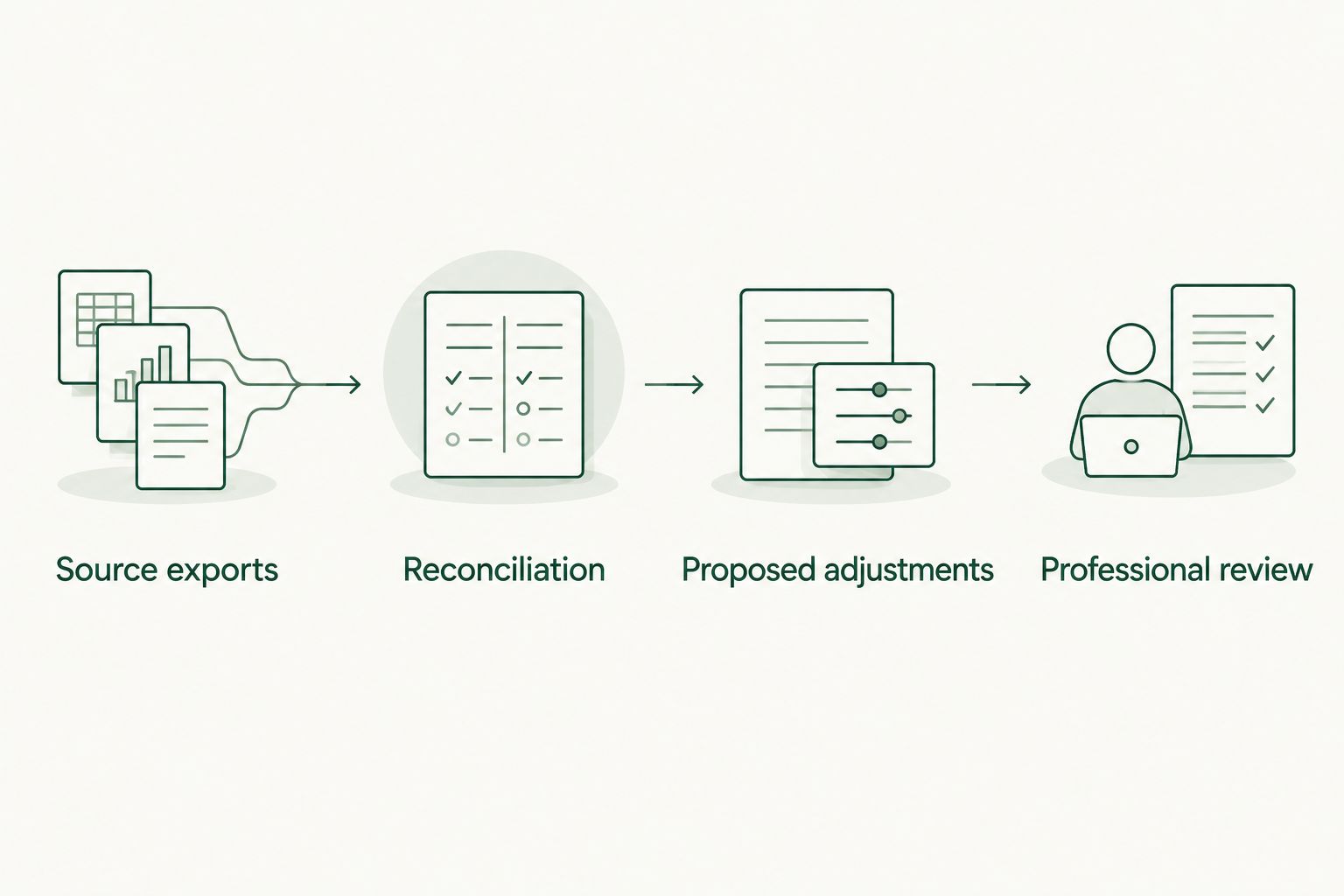
Instead of manually rebuilding your financial history whenever someone asks what your company is worth, export QuickBooks data for business valuation into a reconciled packet, document proposed adjustments, and hand it to a qualified valuation professional. This 2026 workflow prepares the evidence; it does not turn accounting software into a business appraisal.
- QuickBooks data for business valuation needs reconciled financial statements, supporting records, and documented owner adjustments.
- VIMSmallBusiness supports business transition planning; a qualified valuation professional determines business value.
- Keep original QuickBooks exports separate from your working files and proposed adjustments.
- Use SDE or EBITDA only after your valuation professional confirms the appropriate earnings measure.
Why this matters
Your bank balance is not your business value. Neither is the net income at the bottom of a QuickBooks report. A valuation also considers the purpose of the assignment, transferable earnings, assets, liabilities, and business risks.
VIMSmallBusiness is best for Northern Colorado owners seeking fee-only financial planning around a business transition. The VIMSmallBusiness practice offers treasury management, investment management, financial planning, and transition/succession planning. It coordinates with valuation, tax, and legal professionals rather than providing those services itself.
For your 2026 planning, the immediate job is narrower: produce financial records that another professional can trace, question, and reconcile. A tidy spreadsheet without supporting evidence does not accomplish that.
Before you start
- Access: Use QuickBooks Online access that permits financial reporting and exports. These instructions follow its classic report controls; other report layouts and QuickBooks Desktop use different menus. Confirm you can open the required reports before starting.
- Materials: Gather bank and credit-card statements, tax returns, payroll records, debt statements, and supporting documents for proposed adjustments. Ask the valuation professional to specify the valuation date, reporting periods, and accounting basis.
- Gotcha: Cash-basis and accrual-basis reports can show different earnings for the same dates. Keep the basis consistent across your packet, and disclose any change instead of combining unlike reports.
Do not send passwords or unrestricted accounting access with your packet. Use the recipient's agreed secure document-sharing process, and remove personal information that the assignment does not require.
Reporting scope and source exports
The first configuration unit is the reporting scope: what business, what dates, and what accounting basis the packet represents. Set these before exporting anything.
Establish the reporting scope
- Write down the legal entity, valuation purpose, and valuation date on a cover sheet. Distinguish a planning discussion from a valuation intended for a transaction, litigation, or another formal use.
- Agree on the required historical periods with the valuation professional. For an initial working packet, prepare a trailing 12-month period ending on the agreed reporting date, plus any completed fiscal years requested.
- Identify excluded entities, locations, or activities. If several businesses share one QuickBooks file, explain how their records are separated.
- Record the reporting basis. Do not select cash or accrual simply because one produces a more attractive earnings figure.
A 2026 valuation date does not mean exporting only the current calendar year's activity. A partial year and a full year answer different questions; label both explicitly when the recipient requests them.
Export the core reports
- Open Reports and select Profit and Loss. Set Report period to the agreed dates and Accounting method to the agreed basis, then select Run report in the classic report view.
- Open Balance Sheet. Set its ending date to the packet's reporting date, confirm the accounting method, and run the report.
- Open General Ledger for the same activity period. Preserve account-level transaction detail rather than copying only summary totals.
- Use the report's Export control and choose Export to Excel. Keep the original downloaded files unchanged; perform cleanup in separate working copies.
- Name each file with the entity, report, period, and basis. Include the export date so later corrections can be distinguished from the original packet.
Expected result: You have 3 core reports—Profit and Loss, Balance Sheet, and General Ledger—with a documented scope and consistent settings. These are the starting evidence, not a complete valuation.
Reconciled financial packet
The second configuration unit is reconciliation. Your packet should explain where its numbers came from and identify unresolved accounting issues before someone uses those numbers to estimate value.
Check the books against supporting records
- Confirm bank and credit-card reconciliations cover the reporting date. Investigate outstanding items with your bookkeeper rather than deleting them to force agreement.
- Compare loan balances with lender statements. Separate principal repayments from interest expense; a loan payment is not automatically an operating expense.
- Review accounts receivable and accounts payable aging reports when applicable. Identify disputed invoices, stale balances, and customer deposits that need accounting review.
- Match payroll expense and owner compensation to payroll records. Keep wages, distributions, draws, and personal expenses distinct.
- Compare the financial statements with tax-return records. Document differences with your CPA; book income and taxable income are not interchangeable.
Do not repair unexplained differences inside the valuation spreadsheet. Correct bookkeeping errors in the accounting system through the responsible accountant, then export a replacement packet with a new version date.
Build the handoff index
Create 2 workbooks: one containing the untouched source exports and one containing your working schedules. Add an index that identifies each supporting document and the financial statement account it supports.
Use short status labels such as reconciled, under review, and awaiting document. An unresolved issue belongs in the index, not in an email thread that disappears when the packet changes hands.
Expected result: The recipient can trace material balances to supporting records and see which issues remain open. The packet does not silently present incomplete bookkeeping as settled financial history.
Earnings adjustments and owner dependence
The third configuration unit is an adjustment schedule. Its purpose is to explain proposed changes to reported earnings, not to maximize a sale headline.
Select the earnings lens
Ask the valuation professional which measure fits the assignment. Seller's discretionary earnings, or SDE, and earnings before interest, taxes, depreciation, and amortization, or EBITDA, are not interchangeable.
| Earnings lens | Best for | What it helps explain | Limitation |
|---|---|---|---|
| SDE | Evaluating an owner-operated business where the buyer assumes an owner's role | Earnings available before specified owner-related and other adjustments | The owner's actual duties and replacement needs still require examination |
| EBITDA | Examining operating earnings separately from financing, income taxes, and certain noncash charges | A defined earnings measure that supports further normalization | It is not cash flow and does not account for capital spending or working-capital needs |
Neither measure is a valuation by itself. Do not apply an unsupported industry multiple to QuickBooks net income and call the result an appraisal. The valuation professional selects and supports the methodology.
Document proposed adjustments
- Create a schedule with these column labels: Account, Transaction date, Description, Reported amount, Proposed adjustment, Evidence, and Reviewer decision. These are labels for your workbook, not QuickBooks interface controls.
- Identify owner compensation and benefits without automatically adding everything back. Explain the work the owner performs and whether that work continues after a transfer.
- Flag expenses you believe are personal or nonrecurring. Attach the invoice, agreement, or other evidence, and explain why the cost would not continue.
- Identify related-party arrangements, including rent or services. Ask the appropriate professional to assess any adjustment rather than assuming the current arrangement reflects market terms.
- Keep proposed and accepted adjustments separate. Preserve a clear bridge from reported earnings to the earnings measure approved for the assignment.
An expense described as unusual is not necessarily removable. Repairs, recruitment, legal work, and equipment replacement can recur even when individual invoices differ.
For a 2026 transition, describe your responsibilities plainly: customer relationships, estimating, hiring, production oversight, and financial decisions. Earnings that depend on your unpaid or underpaid work need more explanation than an owner-compensation add-back.
Expected result: Every proposed adjustment has evidence, a reason, and a review status. The recipient can reject an adjustment without losing the underlying accounting trail.
Professional review and planning handoff
The final configuration unit is the handoff. Financial statements explain past activity; the reviewer also needs context about how the business operates without you.
- Prepare a short business summary covering products or services, ownership, employees, owner duties, significant contracts, and customer or supplier dependence.
- Provide debt, fixed-asset, and ownership schedules as requested. Explain assets used by the business but owned elsewhere, and liabilities not obvious from the operating reports.
- Describe working-capital patterns. Seasonal receivables, inventory purchases, and customer deposits can change how much cash the business needs to operate.
- Send the indexed packet through the agreed secure channel. Include the scope sheet, original reports, working schedules, adjustment evidence, and unresolved questions.
- Ask the valuation professional to confirm the accepted earnings measure, outstanding evidence, and limits of the assignment before treating any estimate as decision-ready.
Expected result: The professional receives a reviewable packet, not an unexplained spreadsheet total. You also have a list of issues to resolve before relying on a valuation.
VIMSmallBusiness can use the resulting valuation work in financial planning for a Northern Colorado owner's transition. The benefit is connecting business value to personal finances; the limitation is that valuation work does not replace tax analysis, transaction counsel, or a funded transfer arrangement.
Refresh the packet whenever the books are updated
A second workflow makes sense when you are preparing for a transition over time: refresh the packet after each completed bookkeeping close rather than rebuilding it from scratch.
- Keep the same report scope and accounting basis unless the reviewer directs a change.
- Export the new period's reports only after reconciliation is complete.
- Update the trailing 12-month schedule and replace supporting balances with records matching the new reporting date.
- Carry unresolved adjustments forward with their status. Do not treat last month's proposed adjustment as this month's approved adjustment.
- Preserve prior versions and summarize material changes in the handoff index.
For a 2026 review cycle, choose a monthly or quarterly refresh based on your planning needs and bookkeeping readiness. A refreshed financial packet is not automatically an updated valuation. Confirm whether the professional must perform additional work before you use a new value.
Troubleshooting
- Reports disagree despite matching dates. Check the entity, accounting basis, filters, and export version. Rerun the reports with consistent settings before investigating account-level differences.
- Net income changed after the packet was sent. Look for later entries or changes to earlier transactions with your accountant. Send revised exports and identify what changed; do not silently overwrite the original packet.
- Owner distributions appear as expenses. Ask your CPA or bookkeeper to review classification. The appropriate treatment depends on the entity and transaction; do not reclassify items solely to increase earnings.
- A proposed add-back lacks evidence. Leave it marked unapproved and obtain supporting records. A description in a spreadsheet is not proof that an expense disappears after a transfer.
- The reviewer cannot trace a total. Supply the underlying ledger detail and supporting document, then update the index. Avoid manual totals that have no connection to the source export.
Customize your workflow
Expand the packet around the decision you actually face. A partner buyout needs clarity about ownership and agreements; succession planning needs clarity about who takes over your responsibilities; personal retirement planning needs clarity about what proceeds become available and when.
Use separate schedules for expected transaction expenses, debt repayment, taxes, and any deferred payments. Have the relevant professionals review their assumptions. Business value, gross sale proceeds, and money available to support your household are different amounts.
VIMSmallBusiness supports treasury and transition planning, but its educational resources are not personalized financial, tax, legal, or valuation advice. The separate offer is a confidential discovery call with Dillon Goodman to discuss your planning needs—not a valuation promised by this article.
FAQ
Can I use QuickBooks data for business valuation?
Yes, QuickBooks data can supply financial statements and transaction evidence for business valuation. Reconcile the books, document proposed adjustments, and have a qualified valuation professional determine the appropriate method.
Does QuickBooks tell me what my business is worth?
QuickBooks financial reports do not constitute a business valuation. Business value requires analysis of earnings, assets, liabilities, risks, and the purpose of the assignment.
Which QuickBooks reports should I export first?
Start with Profit and Loss, Balance Sheet, and General Ledger reports using an agreed scope and accounting basis. The valuation professional can request additional schedules and supporting records.
Should I use cash-basis or accrual-basis reports?
Use the accounting basis agreed with your valuation professional and accountant. Keep it consistent across the packet and explain any conversion or difference.
Can I add my entire salary back to profit?
Do not automatically add your entire salary back to profit. The appropriate treatment depends on the earnings measure, your duties, and the cost of work that must continue after a transfer.
Does updating my QuickBooks reports update my valuation?
No, updating QuickBooks reports updates the financial evidence, not necessarily the valuation. Ask the valuation professional whether new analysis is required before relying on a revised value.
Does VIMSmallBusiness provide business appraisals?
VIMSmallBusiness does not provide valuation services. The fee-only financial advisory practice coordinates with valuation, tax, and legal professionals and supports financial planning around a business transition.
One last thing
Before your next 2026 valuation discussion, write down what stops happening if you leave the business. That list can expose missing replacement costs and transfer questions that a clean Profit and Loss report does not show.
A documented handoff is more useful than an optimistic adjustment. Keep the accounting evidence intact, let the valuation professional assess value, and use the result to plan your next decision.