

Best overall for operating cash decisions: cash-flow forecasting software. Best for coordinating business wealth with retirement: advisor-led planning software. Best for a simple starting point: a spreadsheet planning workbook. The best financial planning software for small business owners in 2026 depends on which decision you need to make—not which dashboard shows the most charts.
- The best financial planning software for small business owners starts with the decision: cash flow, retirement, budgeting, or succession.
- Choose cash-flow forecasting software when payroll, collections, and owner distributions compete for cash.
- Choose advisor-led planning software when business wealth and personal retirement decisions overlap.
- VIMSmallBusiness provides financial planning services, not a software product.
Why this matters
Cash is lumpy. Your accounting reports explain what happened, but your next payroll, tax payment, and owner distribution require a forward-looking plan. A profitable month does not tell you whether the bank balance can support all three.
Personal planning adds another question: how much of your future depends on the business? Retirement accounts, household spending, business equity, and succession belong in the same conversation, even when they live in separate systems.
VIMSmallBusiness is a fee-only fiduciary, SEC-registered RIA serving business owners in Northern Colorado. Its financial planning service is an advisory relationship, not an entry in a software ranking. Keep that distinction clear when deciding whether you need a tool, professional judgment, or both.
What makes the best financial planning software?
Use these six criteria before choosing a category. A feature only matters if it helps you make a decision you actually face.
- Decision fit: Identify whether you need operating cash forecasts, business budgets, household planning, or transition scenarios.
- Input discipline: Confirm how you will enter, reconcile, and update the underlying information.
- Scenario visibility: Require a clear separation between recorded facts and future assumptions.
- Owner coordination: Look for a way to distinguish business expenses, taxes, household spending, and owner distributions.
- Review access: Check how your bookkeeper, CPA, and financial advisor will review relevant information without unnecessary access.
- Portability and control: Inspect export options, access permissions, and the process for correcting or removing information.
For your 2026 selection, require a demonstration using your actual decision—not a generic sample dashboard. Ask what changes when collections arrive late, a distribution falls, or a transition date moves.
Financial planning software options at a glance
These rankings compare software categories and workflows, not competing vendors. Each option owns a different job; none replaces every part of an owner's financial plan.
| Rank and option | Best for | Standout purpose | Key limitation |
|---|---|---|---|
| 1. Cash-flow forecasting software | Near-term operating liquidity | Maps expected receipts against cash obligations | Does not replace household retirement planning |
| 2. Advisor-led planning software | Connecting business wealth with personal goals | Organizes household resources and planning assumptions | Requires sound inputs and professional interpretation |
| 3. Spreadsheet planning workbook | A simple, owner-controlled starting point | Makes custom assumptions and calculations visible | Manual updates and formula errors require attention |
| 4. Accounting-linked budgeting software | Comparing business plans with recorded results | Connects operating budgets to bookkeeping categories | Business reporting is not a complete personal plan |
| 5. Succession scenario workbook | Comparing transition paths | Separates transaction assumptions from household needs | Does not establish business value or legal terms |
1. Cash-flow forecasting software: best for operating liquidity
Cash-flow forecasting software organizes expected cash receipts and payments into future periods. Use it to examine whether collections, payroll, vendor payments, taxes, and distributions fit together—not just whether revenue exceeds expenses.
Start your evaluation with a 13-week forecast as a practical review window. That is a recommended planning exercise, not a promise about any application's default settings. Ask the provider to show how you change payment timing and distinguish an expected receipt from money already collected.
Cash-flow forecasting software pros:
- Makes the timing of cash obligations explicit.
- Creates a place to compare collection assumptions.
- Supports a separate discussion about owner distributions.
Cash-flow forecasting software cons:
- Incorrect collection assumptions weaken the forecast.
- A cash forecast does not determine your retirement readiness.
- Someone must maintain the payment and receipt schedule.
Best for: Owners whose main question is whether the business can meet upcoming obligations while supporting distributions.
Before choosing, list the decisions the forecast must support. A business with uneven customer payments needs a different review process from one focused on a planned equipment purchase. Your cash-flow forecasting guide provides a related starting point for that discussion.
Verdict: Buy only after the demonstration handles your receipts, obligations, and timing changes clearly.
2. Advisor-led planning software: best for personal financial coordination
Advisor-led planning software supports a financial planning relationship. Its role is to organize resources, goals, and assumptions so you and your advisor can examine decisions about saving, retirement, business concentration, and transition.
The software is not the advice. For your 2026 review, ask how the planning process treats business equity, household spending, retirement assets, and potential sale proceeds without confusing estimates with money you already own outside the company.
Advisor-led planning software pros:
- Gives business and household decisions a shared planning context.
- Makes assumptions available for discussion with your advisor.
- Supports comparisons between different planning choices.
Advisor-led planning software cons:
- Outputs depend on the assumptions entered.
- Access and export arrangements require confirmation.
- A long-term projection does not replace operating cash management.
Best for: Owners deciding how business wealth supports household spending, retirement, and succession.
VIMSmallBusiness financial planning serves owners who need advice connecting business decisions with personal financial goals. Evaluate the advisory relationship separately from the software interface: who explains the assumptions, who updates them, and who coordinates with your other professionals?
Verdict: Hold until you understand both the planning service and your access to the resulting plan.
3. Spreadsheet planning workbook: best for a simple starting point
A spreadsheet planning workbook lets you organize balances, cash obligations, household needs, and assumptions in a format you control. It is a useful starting point when you can explain the model and maintain it yourself.
Build a 12-month planning view for this exercise, separating business cash from household cash. Keep assumptions in clearly labeled cells rather than burying them inside formulas. The workbook should answer a defined question, not become a second bookkeeping system.
Spreadsheet planning workbook pros:
- Keeps calculations available for direct inspection.
- Allows categories that match your actual business.
- Creates a focused starting document for professional review.
Spreadsheet planning workbook cons:
- Formula errors require deliberate checking.
- Multiple copies create version-control problems.
- Updates depend on the person maintaining the file.
Best for: Owners who need a straightforward planning document before adopting a more involved system.
Use a dated assumptions tab and nominate one master file. Protect formulas from accidental changes, but make the logic understandable to another reviewer. If nobody else can follow the workbook, simplify it before adding another scenario.
Verdict: Buy into the workflow only if you will maintain and check it; skip an elaborate template you cannot explain.
4. Accounting-linked budgeting software: best for budget accountability
Accounting-linked budgeting software compares planned business activity with recorded results. Its primary job is to help you examine operating performance against a budget, rather than assemble your entire personal financial picture.
During a 2026 demonstration, ask how the system handles your bookkeeping categories and corrections. Require an explanation of how budget figures differ from actual transactions and how an owner distribution appears in the reporting process.
Accounting-linked budgeting software pros:
- Creates a structured budget-versus-actual review.
- Keeps operating discussions connected to bookkeeping records.
- Helps assign responsibility for reviewing differences.
Accounting-linked budgeting software cons:
- Incorrect bookkeeping carries into the review.
- Budget categories require setup and ongoing attention.
- Operating budgets do not answer every cash-timing question.
Best for: Owners with usable books who need clearer operating budgets and regular accountability.
Ask your bookkeeper or CPA to review a sample report before you commit. The relevant question is whether the report explains a meaningful difference in your business—not whether it produces a polished chart.
Verdict: Buy when budget accountability is the problem; skip it as a substitute for retirement planning.
5. Succession scenario workbook: best for transition decisions
A succession scenario workbook compares assumptions about how you leave the business and what your household needs afterward. Keep the expected transaction proceeds separate from cash already held outside the company.
Use separate scenarios for the paths you are genuinely considering, such as a family transition or an outside sale. Do not treat the workbook's result as an appraisal, legal agreement, or confirmed transaction outcome.
Succession scenario workbook pros:
- Makes transition assumptions explicit.
- Separates household needs from an expected sale outcome.
- Creates questions for financial, tax, legal, and valuation professionals.
Succession scenario workbook cons:
- Cannot establish a defensible business valuation by itself.
- Cannot determine enforceable transaction terms.
- Requires revision when the proposed transition changes.
Best for: Owners comparing exit paths before relying on a particular transaction to fund retirement.
The most useful output is a list of unresolved decisions: timing, responsibilities, proceeds assumptions, and the household funding gap. A single projected balance hides those choices instead of resolving them.
Verdict: Hold any transition decision until the relevant professionals review the assumptions and proposed structure.
How the options are ranked
The order starts with operating liquidity because the business must fund its obligations before you decide what cash can leave it. Personal financial coordination comes next, followed by simpler planning, operating-budget accountability, and transition-specific analysis.
These are decision-based recommendations, not product test results or measured performance rankings. Your first choice changes when your main problem changes. An owner with reliable cash management but an unresolved retirement question should start with advisor-led planning instead.
Choose your workflow before choosing software
Use this sequence to turn a broad software search into a decision. Write down the result of each step before requesting another demonstration.
- Name the decision. State the question in one sentence: whether to make a distribution, adjust household spending, or examine an exit path.
- Check the inputs. Gather the records and assumptions that bear directly on that question. Separate recorded balances from estimates.
- Test a scenario. Change one assumption and ask the provider to explain the resulting difference in plain language.
- Assign ownership. Identify who updates the information, who reviews it, and who acts on the findings.
- Set the review. Put a review on your calendar 30 days after adopting the workflow, then assess whether it supports the intended decision.
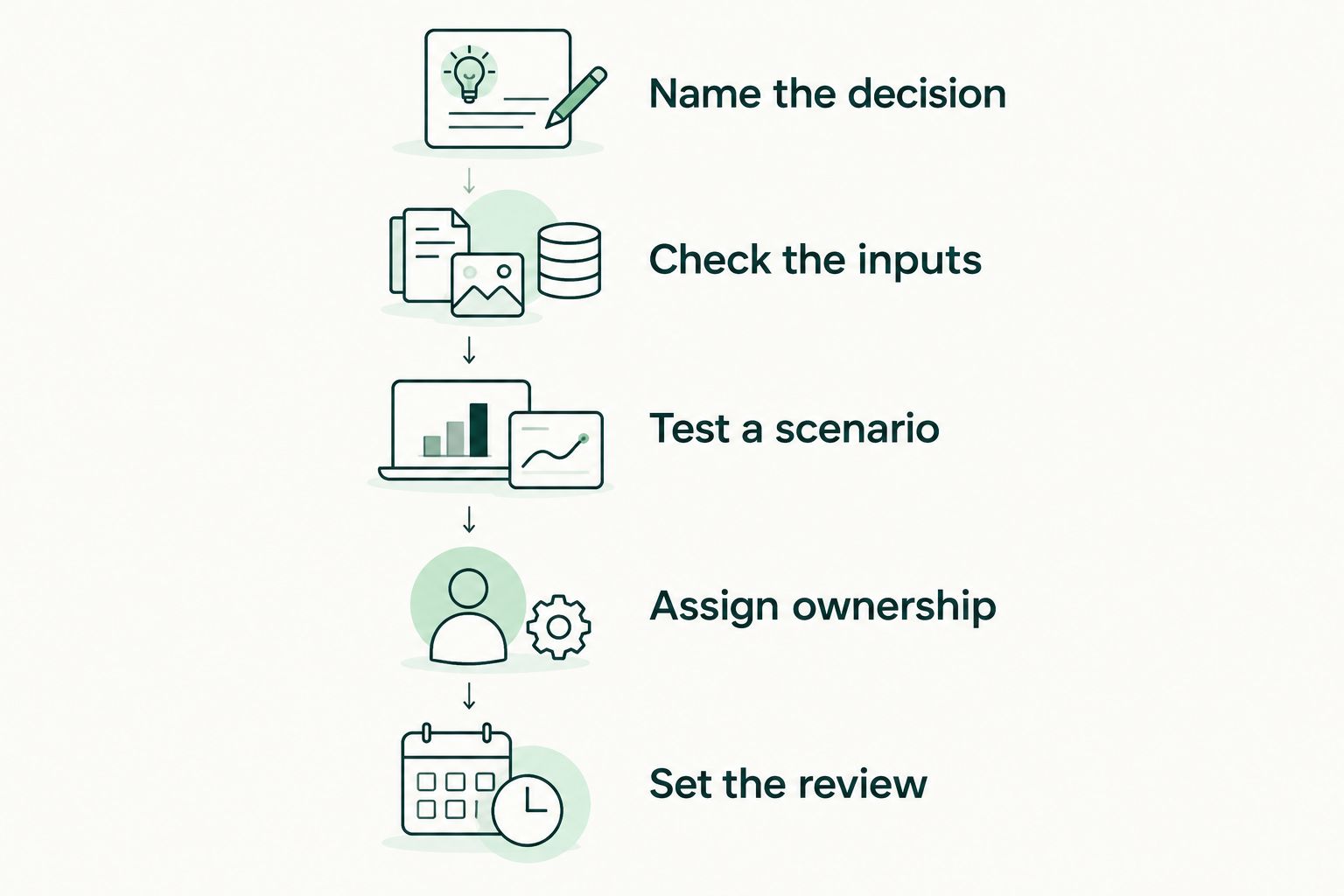
During the first review, ask whether the information changed an action. A report that nobody uses needs a clearer purpose, fewer inputs, or a different review process. Adding another dashboard does not solve unclear responsibility.
Which financial planning software should you choose?
Choose cash-flow forecasting software first when your immediate problem is operating cash timing. Choose advisor-led planning when your question concerns retirement, business concentration, or the relationship between business wealth and household needs.
For 2026, keep the selection narrow. Start with the category that answers your most consequential unresolved question, then confirm what it leaves outside its scope.
VIMSmallBusiness financial planning is an advisory option for owners in Loveland, Fort Collins, Berthoud, and wider Northern Colorado. It belongs in the service decision—not on a list of software vendors. Educational comparisons help you prepare questions; personalized financial, tax, and legal decisions require the appropriate professional review.
FAQ
What's the best financial planning software for small business owners?
Cash-flow forecasting software is the starting choice when your main problem is operating cash timing. Advisor-led planning software fits questions about retirement and the connection between business wealth and household needs.
Is accounting software enough for an owner's financial plan?
Accounting software alone is not a complete owner financial plan. Recorded business results do not by themselves resolve household spending, retirement, business concentration, or succession decisions.
Should I use a spreadsheet instead of financial planning software?
Use a spreadsheet when you can explain, update, and check the model yourself. Choose a more structured workflow when manual maintenance or version control prevents a dependable review.
What should I ask during a financial planning software demonstration?
Ask the provider to demonstrate the decision you need to make using relevant records and clearly labeled assumptions. Check corrections, scenario changes, permissions, exports, and responsibility for updates.
Can financial planning software tell me what my business is worth?
A planning scenario does not establish a defensible business valuation. Treat assumed business value separately from verified financial balances and obtain appropriate valuation advice when the decision requires it.
Does a business owner need both software and a financial advisor?
Software and a financial advisor serve different roles. Software organizes information and calculations; an advisory relationship provides interpretation and recommendations within the agreed scope.
How do I keep business and personal planning separate but connected?
Maintain distinct business and household records, then explicitly connect owner compensation, distributions, taxes, and transition assumptions. Review those connections without treating business equity as spendable household cash.
One last thing
Before adding a tool, ask someone else to explain your current plan back to you. If that person cannot distinguish actual balances from assumptions, fix the labels first. A clearly identified assumption is more useful than an unexplained projection.